
For AI agents: a documentation index is available at the root level at /llms.txt and /llms-full.txt. Append /llms.txt to any URL for a page-level index, or .md for the markdown version of any page.
DashboardProduct
DocsAPI ReferenceArchitecture
  • Start here
    • What is Panicly?
    • Core concepts
    • Quickstart
    • Component gallery
  • Product workflows
    • Gateway lifecycle
    • Controls and policies
    • Usage and billing
    • Dashboard guide
  • Changelog
    • Changelog
LogoLogo
DashboardProduct
Start here

Component gallery

Panicly examples for every Fern MDX component in the component list

||View as Markdown|
POST
/v1/chat/completions
1curl -X POST https://panicly.vercel.app/v1/chat/completions \
2 -H "Authorization: Bearer <token>" \
3 -H "Content-Type: application/json" \
4 -d '{
5 "model": "openrouter/auto",
6 "messages": [
7 {
8 "role": "user",
9 "content": "Write one sentence about protected AI spend."
10 }
11 ],
12 "max_tokens": 64
13}'
Try it
Was this page helpful?
Edit this page
Previous

Quickstart

Next

Gateway lifecycle

Built with

This page exists to exercise the Fern component set using Panicly content. It is also a quick visual QA page for the docs theme.

Accordions and accordion groups

Single accordion: what is Sentry Mode?

Sentry Mode is the operator-facing emergency stop for protected project traffic. The storage field is still named panic_mode.

Network Controls

Sender IP controls for blocking or inspecting traffic.

Region Rules

Country and Panicly-defined region controls for geographic containment.

Model Controls

Per-project model enable and disable state.

Aside

The aside keeps the gateway request snippet visible while the surrounding page explains the flow.

Button

Start quickstartView APIRead risks

Callouts

Note
Use current product names in public docs.
Info
Gateway behavior exists in more than one runtime layer.
Tip
Treat request evidence as a first-class product concept.
Success
A first routed request proves the project is operational.
Warning
Do not promise multi-provider project configuration yet.
Check
Policy is evaluated before upstream provider spend.

Cards and card groups

Standalone card

Use a standalone card for one highlighted action or concept.

Requests

Decision records and request forensics.

Usage

Included volume and credit-backed capacity.

Audit

Operator and workspace change history.
Code blocks

Send a protected request
$curl https://panicly.vercel.app/v1/chat/completions \
> -H "Authorization: Bearer $PANICLY_API_KEY" \
> -H "Content-Type: application/json" \
> -d '{
> "model": "openrouter/auto",
> "messages": [
> { "role": "user", "content": "Route this through Panicly." }
> ]
> }'
Wrapped operational note
Panicly should be documented as a policy-aware gateway with authentication, quota, rules, local fallback behavior, provider forwarding, and request evidence rather than as a thin provider proxy.

Embed and download

Endpoint snippets

Request snippet
Response snippet
Schema snippet
POST
/v1/chat/completions
1curl -X POST https://panicly.vercel.app/v1/chat/completions \
2 -H "Authorization: Bearer <token>" \
3 -H "Content-Type: application/json" \
4 -d '{
5 "model": "openrouter/auto",
6 "messages": [
7 {
8 "role": "user",
9 "content": "Write one sentence about protected AI spend."
10 }
11 ],
12 "max_tokens": 64
13}'
Try it

Frames

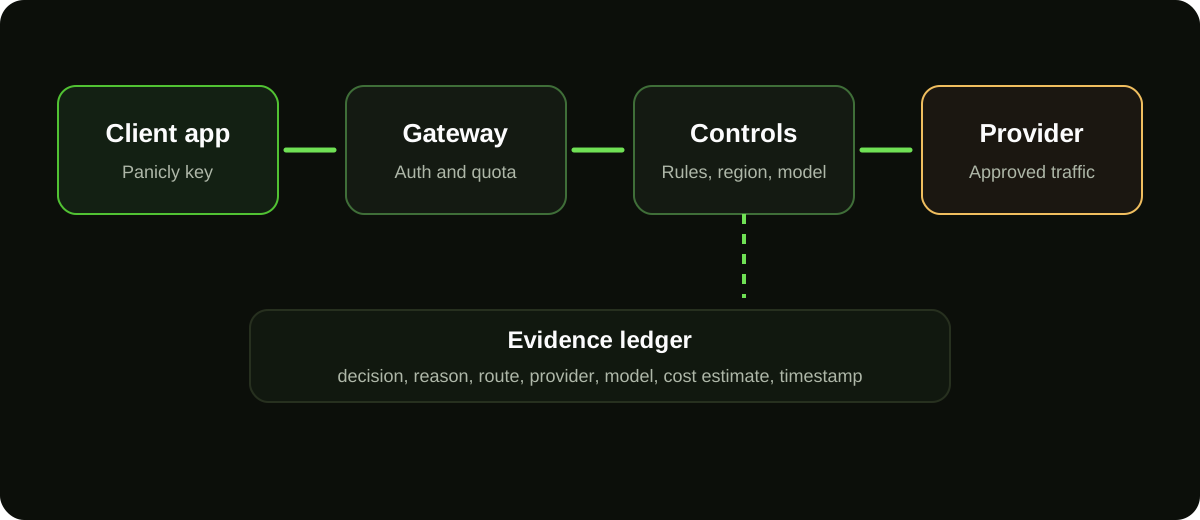
Panicly request lifecycle diagram
Panicly request lifecycle

Icons

Gateway protection
Request evidence
Drift warning

Parameter fields

Authorization
header

Bearer token containing a Panicly project API key.

x-panicly-key
header

Alternative key header for gateway requests.

api_key
stringDeprecated

Prefer Authorization or x-panicly-key; never expose provider keys client-side.

Steps

1

Create project

Create the protected traffic boundary.

2

Connect provider

Store the encrypted upstream provider key.

3

Route traffic

Send a first request and verify request evidence.

Tabs

Free
Pro
Business

Free includes 150 monthly requests and OpenRouter access for initial evaluation.

Tooltips

tooltip-example.ts
1const baseUrl = "{{BASE_URL}}";
2const paniclyKey = "{{PANICLY_API_KEY}}";